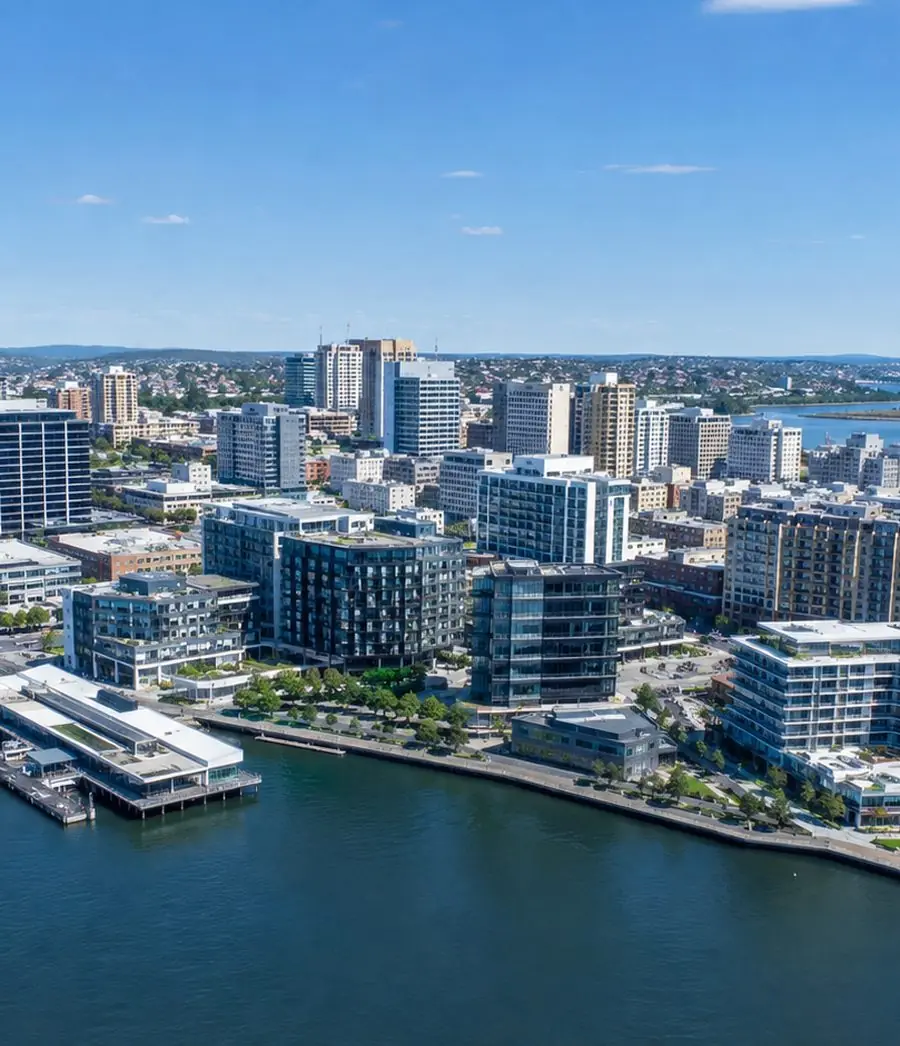
Managed service provider · Newcastle and the Hunter
Managed IT services in Newcastle
We are a managed service provider (MSP) for businesses across Newcastle and the Hunter. We manage IT from head office to your sites and field teams, covering cybersecurity, Microsoft 365, devices, site networks, infrastructure and backup. Support runs through an AI-assisted service desk in Microsoft Teams.
<15 minP1 responseSLA-driven response for critical, business-impacting issues.
2,000+Endpoints supportedAcross users, devices and managed environments.
150+Sites supportedRegional, distributed and multi-site organisations.
24/7SOC & MDR availableMonitoring, detection and response where required.
Operate across
Fully managed IT·Co-managed IT·Microsoft 365·Microsoft Copilot·Cybersecurity·DLP·Azure and hybrid infrastructure·Networks and SD-WAN·Backup and recovery·AI agents and automation
Capability
Built to carry the whole environment
Fully Managed and Co-Managed IT
Flexible service models for broader day-to-day responsibility or additional depth around an internal IT team.
Microsoft 365, Entra ID and Copilot
Administration across Microsoft 365, identity, access, users, licensing and security controls, with Microsoft Copilot implementation and support within the managed environment.
Cybersecurity and data protection
Identity, endpoint security, patching and backup are part of the service. DLP, SOC, MDR and Essential Eight work are available when you need more.
AI, automation and connected solutions
AI agents, automation and integrations built around business systems and information, from targeted process improvements through to broader connected business solutions.
Who we work with
Our services are built around your business
Our clients across Newcastle, the Hunter and regional NSW rely on technology to run production, deliver projects, care for patients and keep teams connected across offices, workshops, sites and suppliers. Fast IT support matters, but so does everything behind it: Microsoft 365, security, infrastructure, site networks, vendors and the ability to keep improving.
Which sounds like you?
01
Manufacturing and industrial operations
Industrial organisations depend on technology across offices, workshops, warehouses, yards, production environments and mobile teams.
We support the people, systems and suppliers behind those operations.
02
Engineering and project businesses
Engineering and project teams work across offices, sites, clients, contractors, specialist applications and changing project locations.
We help keep access, collaboration, devices, connectivity, infrastructure and support consistent as the work moves.
03
Multi-site and regional organisations
Regional organisations often operate through a combination of head office, branches, warehouses, clinics, depots and field teams.
They need common standards, clear escalation and visibility across sites, under one support arrangement.
04
Healthcare and professional services
Clinics, advisory firms and other client-facing organisations depend on secure access to email, documents, business systems and collaboration platforms.
We keep the environment practical for users while identity, information, backup and recovery remain controlled.
05
Organisations with internal IT
Internal IT brings valuable knowledge of users, applications, sites and operational priorities.
We add depth across Microsoft 365, cloud, networks, security and projects, while your team stays in charge.
A selection of our clients
Trusted by Australian businesses
Long-term client relationships across industrial operations, engineering, property, professional services and healthcare.
IT support and operations
What we manage across offices, sites and field teams
The service covers the people and technology doing the work, as well as the infrastructure, networks, security, suppliers and dependencies behind them.
01Users and business IT supportSupport for office users, field teams, shared devices, access requests, onboarding, offboarding, applications and day-to-day issues.Routine requests are handled quickly. Repeated and complex problems move into deeper technical investigation. Automation and AI-assisted triage support how requests are routed and how technical knowledge is recorded.
02Microsoft 365 and identityAdministration across Microsoft 365, Entra ID, Exchange Online, Teams, SharePoint, OneDrive, MFA, Conditional Access, permissions, administrative roles and user lifecycle.We manage the platform as the working environment the business runs on.
03Endpoints and Modern WorkplaceDevice management, endpoint visibility, patching, configuration standards and security controls across office, mobile, shared and field devices.One standard across locations.
04Cloud, infrastructure and networksAzure, servers, storage, virtualisation, firewalls, connectivity, Wi-Fi, branch networks, SD-WAN, remote access and the platforms used across offices and operational sites.Infrastructure and networks are managed together as one connected environment.Secure Networking →
05Backup and recoveryBackup oversight, alerting, restore visibility, recovery dependencies and escalation where recovery risks are identified.The focus is whether the operation can recover when it needs to.
06Vendors and carriersTechnical coordination across carriers, software vendors, hardware suppliers, cloud providers, application partners and local contractors.When an issue crosses suppliers, we stay with the technical problem and handle the coordination for you.
07Documentation and site recordsNetwork diagrams, site dependencies, runbooks, access records, vendor information, device standards and escalation paths remain part of managing the environment.
08Cybersecurity and data protectionIdentity, MFA, endpoint protection, patching, privileged access, Microsoft 365 security, backup visibility, monitoring and escalation form part of the service.Data loss prevention can be added when you need it. Where deeper detection and response is required, 24/7 SOC and MDR can extend that protection.Cybersecurity →
Platforms we operate
AI-assisted service desk
IT support where your team already works
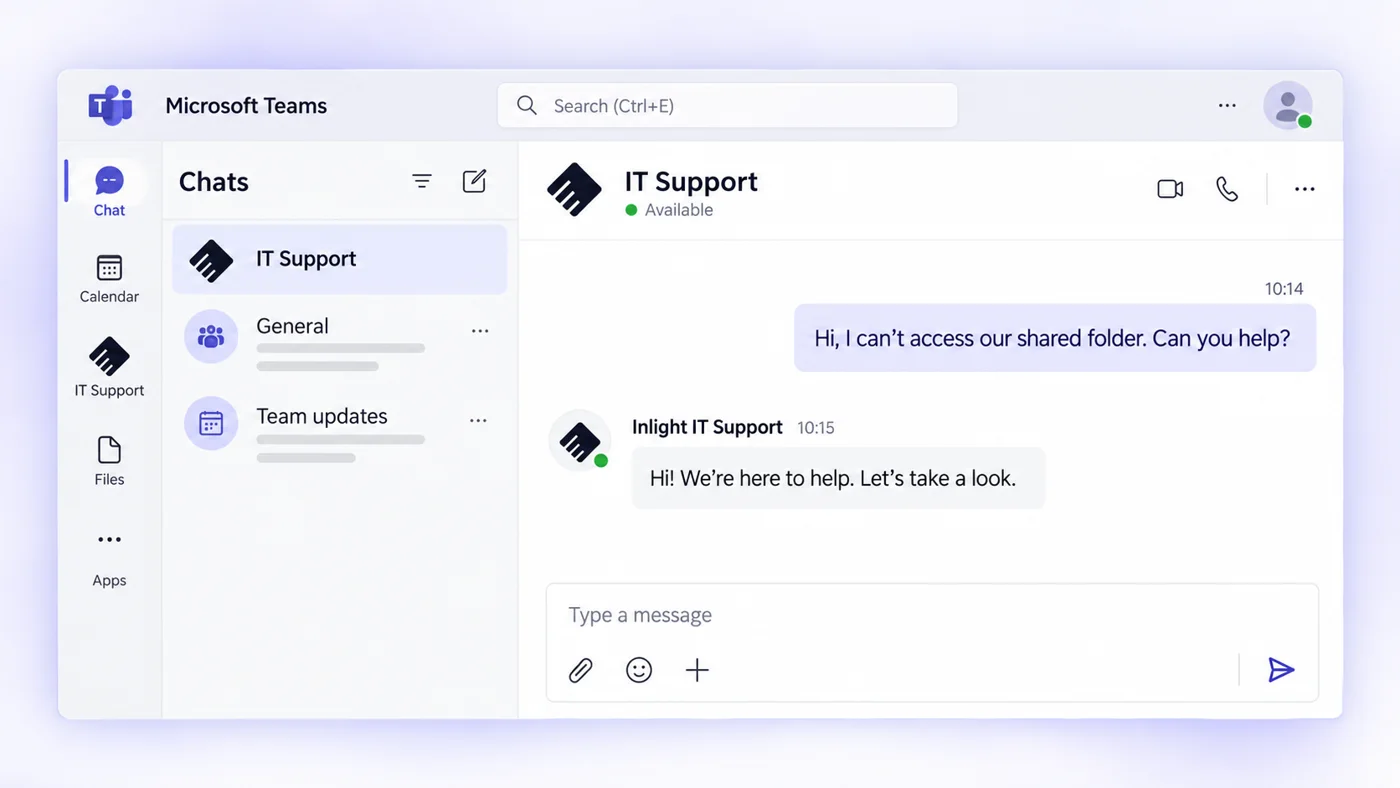
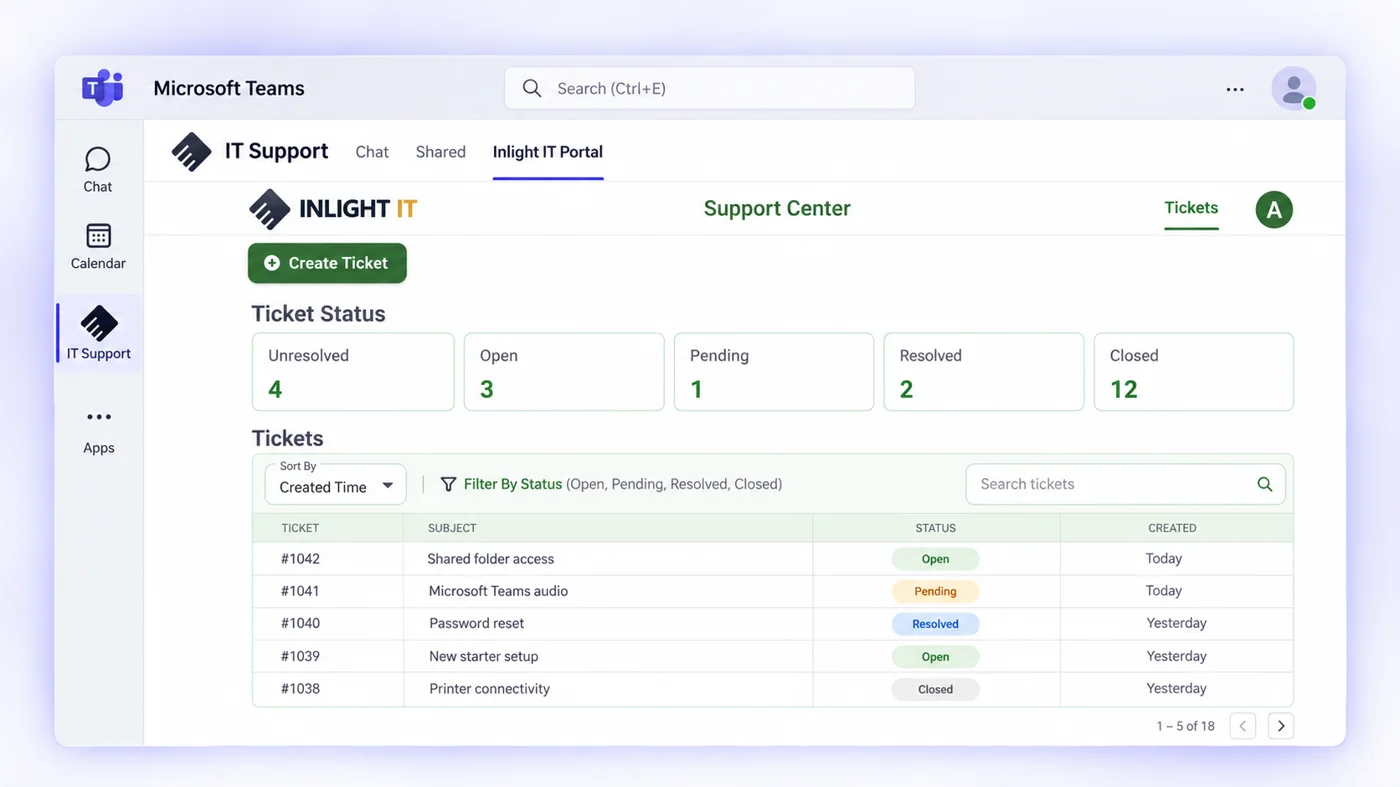
Your staff message IT Support in Microsoft Teams and the request becomes a ticket. AI-assisted triage routes it to an engineer with the relevant skills, and status, history and updates stay in the same app.
Raise it in a Teams chatMessage IT Support like a colleague, straight from Teams, without a phone queue.
Track tickets in TeamsOpen, pending and resolved tickets in your support portal, inside Teams.
P1 response under 15 minutes
AI-assisted triage and routing
Updates and ticket history in the same app
Escalation straight to engineers
Pricing
What would Managed IT cost across your sites?
Set your users and sites to see an indicative monthly cost.
Clients usually reach out when the same problems keep surfacing across support, systems, suppliers, security or internal IT capacity.
01Site issues become head-office problemsAcross the sites
Branches, workshops, warehouses and project locations may have different devices, networks, suppliers and dependencies. A local fault quickly becomes a head-office coordination exercise because ownership of the whole site environment is unclear.
02Vendors keep handing the issue backAcross the sites
The carrier points to the firewall. The application vendor points to the network. The hardware supplier says the device is working. The client is left collecting evidence and moving the issue between suppliers.
03Infrastructure ages without a planInfrastructure and recovery
Firewalls, switches, Wi-Fi, servers, backup systems and site hardware remain in place until support expires or something fails. Without clear lifecycle ownership, replacement becomes an emergency rather than a planned decision.
04Recovery confidence is assumedInfrastructure and recovery
Backups may exist, but restore assumptions, site dependencies and recovery priorities have not been properly tested.
At an operational site, downtime can stop production, dispatch or project delivery.
05Field users receive office-style supportPeople and capacity
Mobile teams, shared workstations, remote access and site applications create different requirements from a conventional office environment.
Support becomes frustrating when the service does not understand how the work is actually performed.
06Internal IT cannot be everywherePeople and capacity
Internal IT may understand the business exceptionally well but cannot carry users, Microsoft 365, infrastructure, sites, cybersecurity, networks, vendors and project work alone.
Important technical work keeps losing to the next urgent operational issue.
We investigate recurring faults and make the changes that stop them coming back. We bring in-house expertise across Microsoft 365, cloud, networks and security to both ongoing support and project delivery. We plan security improvements, upgrades and projects around the environment we manage and your business priorities.
Reactive IT supportManaged IT with Inlight IT
01
Reactive IT supportTreats each site issue as a separate request
Managed IT with Inlight ITWe apply common standards across sites, devices and networks
02
Reactive IT supportHelp arrives when someone can travel
Managed IT with Inlight ITEngineers in Newcastle attend when a site needs hands on
03
Reactive IT supportEach supplier looks after its own piece
Managed IT with Inlight ITWe coordinate carriers and suppliers until the issue is resolved
04
Reactive IT supportSecurity tools sit alongside support
Managed IT with Inlight ITSecurity is part of how we manage accounts, devices and change
05
Reactive IT supportSite changes are worked out as they come up
Managed IT with Inlight ITWe plan site changes around operations and document them
06
Reactive IT supportProjects are handled separately
Managed IT with Inlight ITWe plan projects around the environment we already support
Ways to work with us
Choose the model that works for you
Fully Managed IT
We run your IT day to day
Sample client view
Monthly service reviewFully managed · three sites
✓Patching and updates currenton track
!Two laptops out of warrantyreplace
+Copilot pilot for the finance teamplanned
Priorities agreed with the businesssupport · plan
We manage the environment day to day: business IT support, monitoring, patching, Microsoft 365 and identity, endpoints, infrastructure, networks, backup, vendors, documentation and cybersecurity. Leadership keeps visibility over priorities, risk and planned improvement without carrying the day-to-day IT function internally.
Internal IT stays close to users, applications, sites and business priorities. We add technical depth and capacity across infrastructure, cybersecurity, Microsoft 365, networks, backup, escalation and project delivery. Responsibilities are clearly defined so the two teams strengthen each other rather than duplicate work.
We map your users, sites, systems, suppliers and known issues, then agree responsibilities, escalation paths and SLAs from the start.
02
Transition in planned stages
Access, monitoring, patching, backup and security controls come under management progressively, so users keep working throughout. Most transitions are complete within four to six weeks.
Capability across Microsoft 365, Copilot, cloud, infrastructure, networks, backup and cybersecurity sits behind the IT support we provide, so complex issues reach a specialist who can fix them.
02
Project delivery stays connected to the environment
Infrastructure, cloud, network, Microsoft, cybersecurity and automation projects are delivered with operation, documentation and ongoing support in mind.
03
Security runs inside the day-to-day service
Identity, endpoints, patching, privileged access, backup and monitoring are managed together, all year round.
04
We stay accountable across carriers and vendors
When an issue involves a carrier, application vendor, cloud platform, hardware supplier or local contractor, we coordinate the technical path through it.
05
AI in how we deliver and what we build
Our service desk is integrated directly into Microsoft Teams, with automation and AI-assisted triage behind it. We also design and deliver AI agents, workflow automation and integrations around the systems our clients use.
06
Long-term relationships, built through referral
Many clients have worked with us for five years or more. Much of our growth has come through clients introducing us to other organisations that expect the same technical standard and level of ownership.
FAQ
Common questions about Managed IT
What is included in Managed IT services?
It covers support, monitoring and patching, devices, Microsoft 365 and Entra ID, Copilot, networks and infrastructure, backup, vendors and core security controls.
For regional and multi-site organisations, the service may also include site dependencies, field users, connectivity, local hardware and supplier coordination.
Do you provide onsite IT support across Newcastle and the Hunter?
Yes, across Newcastle and the Hunter, including Maitland, Lake Macquarie, Port Stephens and Cessnock. Our Newcastle office is at 2 Portside Crescent, Maryville NSW 2293. Most day-to-day support is delivered remotely because that is generally the fastest approach.
Onsite support is available where hardware, networks, site access, onboarding, vendor activity or the nature of the issue requires physical attendance.
Can you support multiple sites, workshops and field teams?
Yes. We apply one standard for identity, devices, networks and security across your sites, while allowing for how each site actually works.
Can you work alongside our internal IT team?
Yes. Internal IT stays close to users, sites, applications and business priorities while we add capacity and capability across Microsoft 365, cloud, infrastructure, networks, cybersecurity, backup, escalation and project delivery.
How does cybersecurity fit into Managed IT?
Cybersecurity forms part of everyday IT management, including identity, MFA, endpoint protection, patching, Microsoft 365 security, privileged access, backup visibility and monitoring, with DLP available where required.
Deeper SOC, MDR and specialist cybersecurity services can be added where required.
How much do Managed IT services cost in Newcastle?
Published Australian pricing guides put managed IT services at around $100 to $250 per user per month ex GST, usually before Microsoft 365 licences.
Pricing depends on users and sites, the technology being managed, security requirements and the level of responsibility we take on. Microsoft licensing, hardware, project work and additional specialist services are identified separately where applicable.
Use our Managed IT cost calculator to build an indicative estimate for your users, sites and selected services.
Is Microsoft Copilot part of Managed IT?
Yes. We implement and support Microsoft Copilot within the Microsoft 365 environments we manage, including the identity, permissions, security and information controls around it.
Microsoft licensing is separate.
Can you build AI agents and workflow automation?
Yes. We design and deliver AI agents, Power Platform automation, integrations and connected business solutions around the systems and information our clients use.
The scope depends on the process, systems and level of integration involved.
We support organisations from around 10 users through to large multi-site and co-managed environments.
Managed services are particularly relevant where technology is operationally important and clear responsibility across sites, infrastructure, vendors and users matters.
What is your response time for critical issues?
A P1 incident is a critical, business-impacting issue such as an outage, cyber incident, major connectivity failure, system-wide Microsoft 365 problem or failure affecting a business-critical application. Under our SLA-driven support model, we respond to P1 incidents in under 15 minutes, with escalation based on severity and the systems affected.
Talk to our Newcastle team about your IT support, security and the projects ahead. We’ll work through your requirements and recommend the options that work for you.