We are a managed service provider (MSP) for businesses across Greater Sydney. We manage your cybersecurity, Microsoft 365, devices, networks, cloud and backup as one service, with an AI-assisted service desk in Microsoft Teams. We also build AI agents and automation around the systems you already use.
<15 minP1 responseSLA-driven response for critical, business-impacting issues.
2,000+Endpoints supportedAcross users, devices and managed environments.
150+Sites supportedMetropolitan, regional and multi-site operations.
24/7SOC & MDR availableMonitoring, detection and response where required.
Operate across
Fully managed IT·Co-managed IT·Microsoft 365·Microsoft Copilot·Cybersecurity·DLP·Azure and hybrid infrastructure·Networks and SD-WAN·Backup and recovery·AI agents and automation
Capability
Built for more than day-to-day IT support
Fully Managed and Co-Managed IT
Broader day-to-day management or additional depth around an established internal IT team.
Microsoft 365, Entra ID and Copilot
Administration across Microsoft 365, identity, access, users, licensing and security controls, with Microsoft Copilot implementation and support within the managed environment.
Cybersecurity and data protection
Identity, endpoint security, patching and backup are part of the service. DLP, SOC, MDR and Essential Eight work are available when you need more.
AI, automation and connected solutions
AI agents, automation and integrations built around business systems and information, from targeted process improvements through to broader connected business solutions.
Who we work with
Our services are built around your business
Our clients across Greater Sydney and regional NSW rely on technology to serve customers, run projects, protect information and keep people connected across offices, sites and suppliers. Responsive business IT support matters, but so does what sits behind it: Microsoft 365, security, infrastructure, networks, vendors and the ability to keep the environment moving forward.
Which sounds like you?
01
Property and construction
Head office, site offices and project teams need secure access to documents, drawings and systems wherever the work is.
We keep devices, connectivity and Microsoft 365 consistent as projects start and finish.
02
Professional and advisory
Professional firms depend on secure document handling, reliable Microsoft 365 and the protection of client information.
We keep access controlled and users productive, with security you can evidence when clients ask.
03
Head offices with national operations
A Sydney head office often supports regional, interstate and remote teams.
We apply one standard across identity, devices, networks and vendors, wherever the people are.
04
Engineering and design
Specialist applications, large files and project collaboration put real demands on infrastructure and networks.
We manage the infrastructure and networks behind the work as well as the desktops.
05
Alongside internal IT
Your internal team keeps the business context.
We add depth across infrastructure, cybersecurity, cloud, escalation and projects.
A selection of our clients
Trusted by Australian businesses
Long-term client relationships across property, construction, professional services, engineering, healthcare and industrial operations.
Business IT services
What we manage across offices and sites
The service covers the people and technology doing the work, as well as the infrastructure, networks, security, suppliers and dependencies behind them.
01Users and business IT supportUser support, access requests, onboarding, offboarding, application coordination and escalation. Routine issues are handled efficiently, while repeated or complex problems move into proper investigation.Automation and AI-assisted triage support how our service desk routes requests and records technical knowledge.
02Microsoft 365 and identityMicrosoft 365, Entra ID, Exchange Online, Teams, SharePoint, OneDrive, MFA, Conditional Access, permissions, administrative roles and user lifecycle. We manage the platform as the working environment the business runs on.
03Endpoints and Modern WorkplaceDevice management, endpoint visibility, patching, configuration standards, security controls and support across managed devices and users working from different locations.
04Cloud, infrastructure and networksAzure, cloud platforms, servers, storage, virtualisation, firewalls, connectivity, Wi-Fi, branch networks, SD-WAN and remote access.Where an organisation operates across multiple sites, we design and manage the connectivity behind them as part of the same service.Secure Networking →
05Backup and recoveryBackup oversight, alerting, restore visibility, recovery dependencies and escalation, with attention on whether the business can recover what matters when it needs to.
06Vendors and carriersCoordination across carriers, software vendors, hardware suppliers, cloud providers and specialist application partners.When an issue crosses suppliers, we stay with the technical problem and handle the coordination for you.
07Documentation, lifecycle and improvementDocumentation, known issues, lifecycle risks, recurring problems and planned work remain visible alongside day-to-day support.Ageing technology, licensing decisions and improvement work therefore keep their place on the agenda.
08Cybersecurity and data protectionIdentity, MFA, endpoint protection, patching, privileged access, Microsoft 365 security, backup visibility, monitoring and escalation form part of the service.Data loss prevention can be added when you need it. Where deeper detection and response is required, 24/7 SOC and MDR can extend the protection.Cybersecurity →
Platforms we operate
AI-assisted service desk
IT support where your team already works
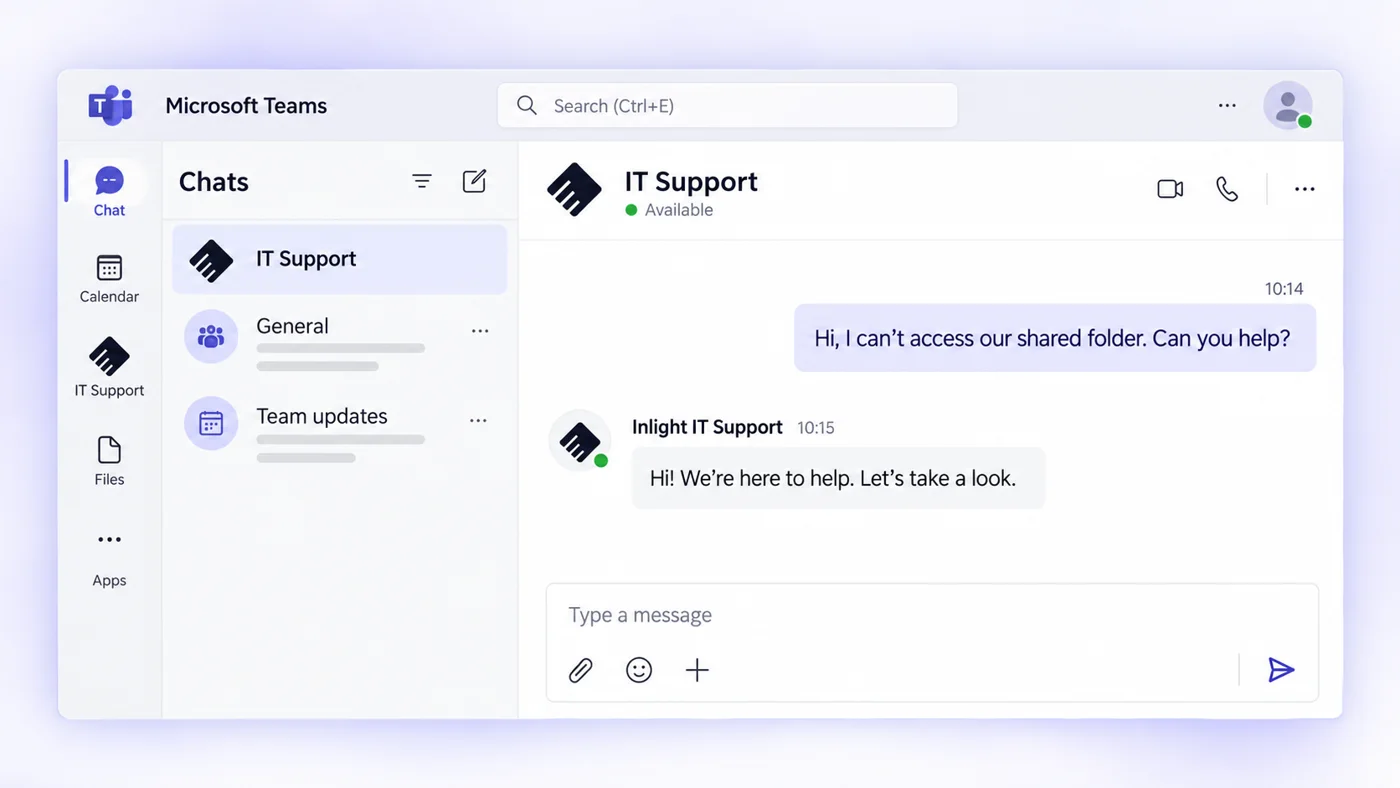
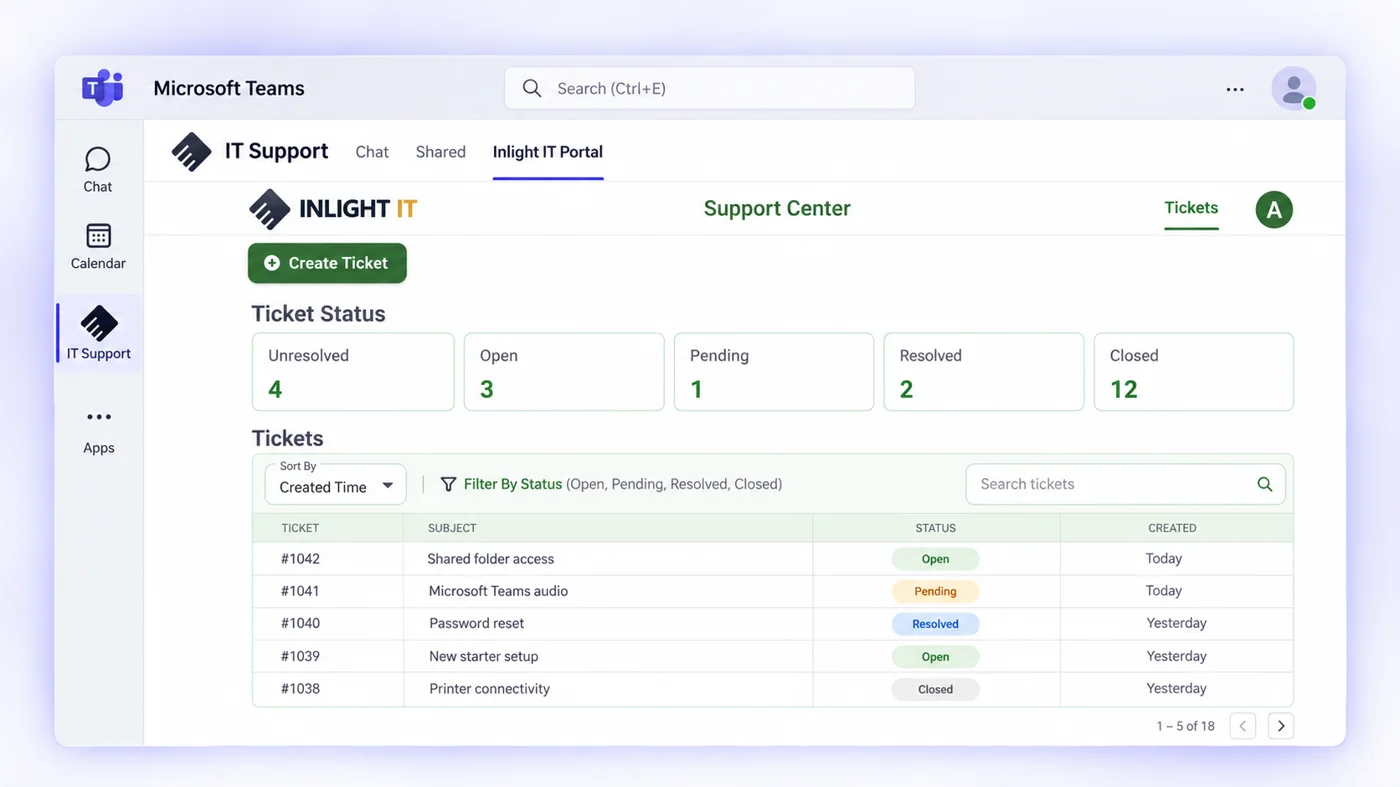
Your staff message IT Support in Microsoft Teams and the request becomes a ticket. AI-assisted triage routes it to an engineer with the relevant skills, and status, history and updates stay in the same app.
Raise it in a Teams chatMessage IT Support like a colleague, straight from Teams, without a phone queue.
Track tickets in TeamsOpen, pending and resolved tickets in your support portal, inside Teams.
P1 response under 15 minutes
AI-assisted triage and routing
Updates and ticket history in the same app
Escalation straight to engineers
Pricing
What would Managed IT cost you?
Set your users and sites to see an indicative monthly cost.
We investigate recurring faults and make the changes that stop them coming back. We bring in-house expertise across Microsoft 365, cloud, networks and security to both ongoing support and project delivery. We plan security improvements, upgrades and projects around the environment we manage and your business priorities.
Reactive IT supportManaged IT with Inlight IT
01
Reactive IT supportFixes the issue in front of it
Managed IT with Inlight ITWe trace recurring issues to their cause and remove them
02
Reactive IT supportEscalation depends on who happens to know
Managed IT with Inlight ITSenior engineers step in when the problem calls for it
03
Reactive IT supportEach supplier looks after its own piece
Managed IT with Inlight ITWe coordinate issues across suppliers until they are resolved
04
Reactive IT supportSecurity tools sit alongside support
Managed IT with Inlight ITSecurity is part of how we manage accounts, devices and change
05
Reactive IT supportDocumentation is written when someone asks
Managed IT with Inlight ITWe keep documentation current as the environment changes
06
Reactive IT supportProjects are handled separately
Managed IT with Inlight ITWe plan projects around the environment we already support
Ways to work with us
Choose the model that works for you
Fully Managed IT
We run your IT day to day
Sample client view
Monthly service reviewFully managed · three sites
✓Patching and updates currenton track
!Two laptops out of warrantyreplace
+Copilot pilot for the finance teamplanned
Priorities agreed with the businesssupport · plan
We manage business IT support and the wider environment, including users, devices, Microsoft 365, identity, monitoring, infrastructure, networks, backup, vendors and cybersecurity. Leadership retains visibility over priorities, risks and planned work without carrying the day-to-day IT function internally.
Internal IT stays close to users, applications and business priorities while we add additional capacity and technical depth across Microsoft 365, infrastructure, cloud, networks, cybersecurity, backup, escalation and project delivery. Responsibilities are clearly defined so the two teams strengthen each other rather than duplicate work.
We map your users, sites, systems, suppliers and known issues, then agree responsibilities, escalation paths and SLAs from the start.
02
Transition in planned stages
Access, monitoring, patching, backup and security controls come under management progressively, so users keep working throughout. Most transitions are complete within four to six weeks.
Microsoft 365, cloud, infrastructure, networking, cybersecurity, backup and project delivery sit within the same technology business, so more complex problems can move beyond frontline support.
02
Microsoft 365 and Copilot capability
We manage the Microsoft environment organisations already rely on and implement and support Microsoft Copilot within it, including the identity, permissions, security and information controls around its use.
03
Security runs inside the day-to-day service
Identity, endpoints, Microsoft 365 security, backup, monitoring and data protection are managed as part of our IT services.
04
AI in how we deliver and what we build
Our service desk is integrated directly into Microsoft Teams, with automation and AI-assisted triage behind it. We also design and deliver AI agents, workflow automation and integrations around the systems our clients use.
05
Long-term relationships, built through referral
Many clients have worked with us for five years or more. Much of our growth comes from clients introducing us to organisations that expect the same standard.
06
Accountability across vendors and technology
When a problem involves Microsoft, a carrier or another vendor, we take it through to resolution, so you're not left working out whose fault it is.
FAQ
Common questions about Managed IT
What is included in Managed IT services?
It covers support, monitoring and patching, devices, Microsoft 365 and Entra ID, Copilot, networks and infrastructure, backup, vendors and core security controls, with DLP available where required.
The exact scope depends on the environment and whether the service is fully managed or co-managed.
How is Managed IT different from basic IT support?
IT support primarily deals with issues as they occur. Managed services also cover the environment behind those requests, including Microsoft 365, identity, endpoints, monitoring, infrastructure, networks, backup, vendors, security controls, documentation and ongoing improvement.
Do you provide business IT support in Sydney?
Yes. We provide business IT support and managed IT services across Greater Sydney, including the CBD, North Sydney, the North Shore, Chatswood, Macquarie Park, Parramatta and Western Sydney, with support for sites across NSW. Our office is at Level 25, 100 Mount Street, North Sydney NSW 2060.
Most day-to-day support is delivered remotely, with onsite support where the technology or situation requires physical attendance.
How much do Managed IT services cost in Sydney?
Published Australian pricing guides put managed IT services at around $100 to $250 per user per month ex GST, usually before Microsoft 365 licences.
Pricing depends on the number of users and sites, the technology being managed, security requirements and the level of responsibility we take on. Microsoft licensing, hardware, project work and additional specialist services are identified separately where applicable.
Use our Managed IT cost calculator to build an indicative estimate for your users, sites and selected services.
What is your response time for critical issues?
A P1 incident is a critical, business-impacting issue such as an outage, cyber incident, major connectivity failure, system-wide Microsoft 365 problem or failure affecting a business-critical application.
Under our SLA-driven support model, we respond to P1 incidents in under 15 minutes, with escalation based on severity and the systems affected.
Do you manage Microsoft 365 and Copilot?
Yes. We manage Microsoft 365 and Entra ID environments including users, identity, Exchange Online, Teams, SharePoint, OneDrive, security controls and administration.
Microsoft Copilot implementation and support are part of our IT services. Microsoft licensing is separate.
Can you build AI agents and workflow automation?
Yes. We design and deliver AI agents, Power Platform automation, integrations and connected business solutions around the systems and information our clients use.
The scope depends on the process, systems and level of integration involved.
Yes. Co-managed IT is designed for organisations that have internal capability but need additional depth, capacity, escalation or specialist expertise.
Yes. We use a staged transition covering access, documentation, Microsoft 365, infrastructure, networks, backup, security, vendors, known issues and responsibilities.
The environment moves across in planned stages, and most transitions are complete within four to six weeks.
Can you support offices and sites outside Sydney?
Yes. Many organisations have sites across regional NSW, interstate and nationally. We support distributed and multi-site environments through remote management, consistent technical standards, engineering escalation and planned onsite work where required.
What size organisations do you support?
We support organisations from around 10 users through to large multi-site and co-managed environments.
Fit usually depends on the complexity and importance of the technology environment more than headcount.
Talk to our Sydney team about your IT support, security and the projects ahead. We’ll work through your requirements and recommend the options that work for you.
A conversation with an engineer who knows Microsoft 365, cloud, networks and security